Tireweb / Connections / AutoOps

Tire shopping and install booking in one flow — powered by AutoOps.

When a customer selects tires through Tireweb TireSearch or Retail, AutoOps launches to handle the appointment booking. The customer books their install, then returns to Tireweb to complete checkout. Tireweb owns the product and payment. AutoOps owns the schedule.

  • AutoOps launches as a popup at the scheduling step
  • Tire, customer, and vehicle details carry through
  • Payment and checkout stay in Tireweb
Tireweb + AutoOps

Tireweb
Product & payment
Details →
← Booking
AutoOps
Scheduling popup
Popup
scheduling
Checkout
in Tireweb
The platform

What is AutoOps?

AutoOps is an online scheduling platform for auto repair and tire shops, part of the Steer CRM family. It provides shops with a standalone appointment booking experience that can be embedded or launched as a popup on any website.

AutoOps is designed to handle the full scheduling interaction — service selection, customer and vehicle details, appointment time selection, and confirmation — without requiring the shop to build that workflow themselves.

How it works

The Tireweb + AutoOps integration.

The AutoOps integration works differently from a direct scheduling API. Rather than Tireweb calling AutoOps in the background, AutoOps launches as a dedicated popup window at the scheduling step of the customer journey. The customer completes their appointment booking inside AutoOps, and then returns to Tireweb to finish checkout and payment. This means the two systems handle what each does best: Tireweb manages tire selection, pricing, and payment; AutoOps manages the scheduling experience.

Tireweb TireSearch + Retail Product & payment AutoOps Scheduling popup Tire, customer & vehicle details Booking confirmation returned
Step by step

How the flow works.

  1. Customer selects tires in TireSearch or Tireweb Retail as usual.
  2. AutoOps launches as a popup at the scheduling step, with tire and customer details pre-populated where possible — selected services, vehicle details, and tire information passed through to the notes field.
  3. Customer books their appointment inside AutoOps, selecting their preferred time.
  4. AutoOps returns the booking details to Tireweb and the popup closes.
  5. Customer completes checkout back in Tireweb — payment and order confirmation happen in Tireweb, not in AutoOps.
From Tireweb to AutoOps (pre-populated at launch)
  • Selected service (tire install)
  • Customer details
  • Vehicle details
  • Tire information passed through to the notes field
From AutoOps to Tireweb
  • Booking confirmation details returned upon appointment completion
What the customer sees

The scheduling popup, in the buying flow.

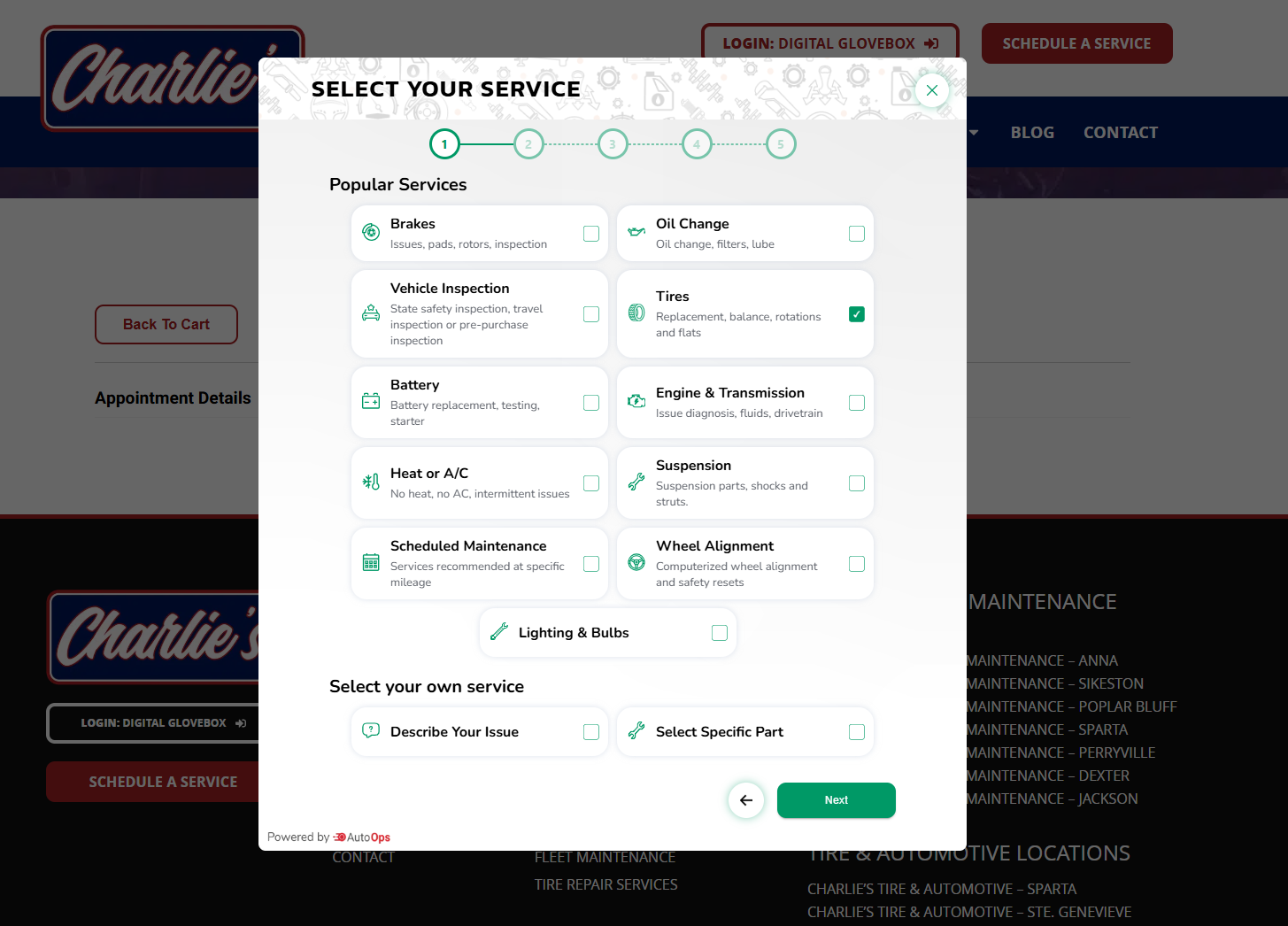
At the scheduling step, the AutoOps popup opens right over the shop's site with the customer's tire selection already carried in. They confirm their service and pick a time without leaving the buying flow — then return to Tireweb to complete checkout.

The AutoOps 'Select your service' scheduling popup as a customer sees it — opened over a tire shop's website with Tires pre-selected, a step indicator, and a grid of popular services.
The AutoOps scheduling popup at the “Select your service” step, launched over the shop's site with Tires already selected. “Powered by AutoOps” — checkout still happens in Tireweb.
Try the live demo See the TireSearch demo
Compatible Tireweb products

AutoOps scheduling works across two Tireweb products.

Tireweb TireSearch — embedded tire shopping widget. When a customer reaches the scheduling step, AutoOps launches as a popup to handle appointment booking before the customer completes the TireSearch checkout.

Tireweb Retail — consumer ecommerce and install booking. AutoOps handles the install scheduling step within the Retail checkout flow.

Explore Tireweb TireSearch Explore Tireweb Retail
Why it matters

Each system does what it does best.

A complete scheduling experience, not just a time slot

AutoOps manages the full appointment booking interaction — service confirmation, customer and vehicle capture, time selection — in its own dedicated flow. The customer gets a polished scheduling experience without Tireweb needing to build and maintain that workflow.

Tire details carry through

When AutoOps launches, it opens with the customer's tire selection, vehicle details, and service already pre-populated — reducing the steps the customer has to repeat.

Tireweb keeps control of payment

After booking, the customer returns to Tireweb to complete checkout. Pricing, payment, and order confirmation stay in Tireweb — AutoOps handles only the scheduling step.

Works alongside your existing AutoOps setup

If your shop is already using AutoOps for general appointment booking, the Tireweb integration adds tire shopping as another channel that feeds into the same scheduling system.

Already using AutoOps? Connect it to your tire shopping experience.

We'll show you how the AutoOps popup fits into a TireSearch or Retail checkout flow — from tire selection to confirmed appointment — on a 30-minute walkthrough.