Wheel Visualizer: How It Works and Why Every Tire Shop Needs One
A wheel visualizer lets customers see any wheel on their actual vehicle before they buy. Here is how the technology works, what separates a good one from a gimmick, and how to add one to your shop's website.
Nobody buys wheels off a spec sheet. A customer shopping for tires might settle for a size and a price, but a customer shopping for wheels is buying a look, and until they can see that look on their own truck, they hesitate. That hesitation is where wheel sales stall: at the counter, in the group chat, in the "let me think about it."
A wheel visualizer removes it.
What is a wheel visualizer?
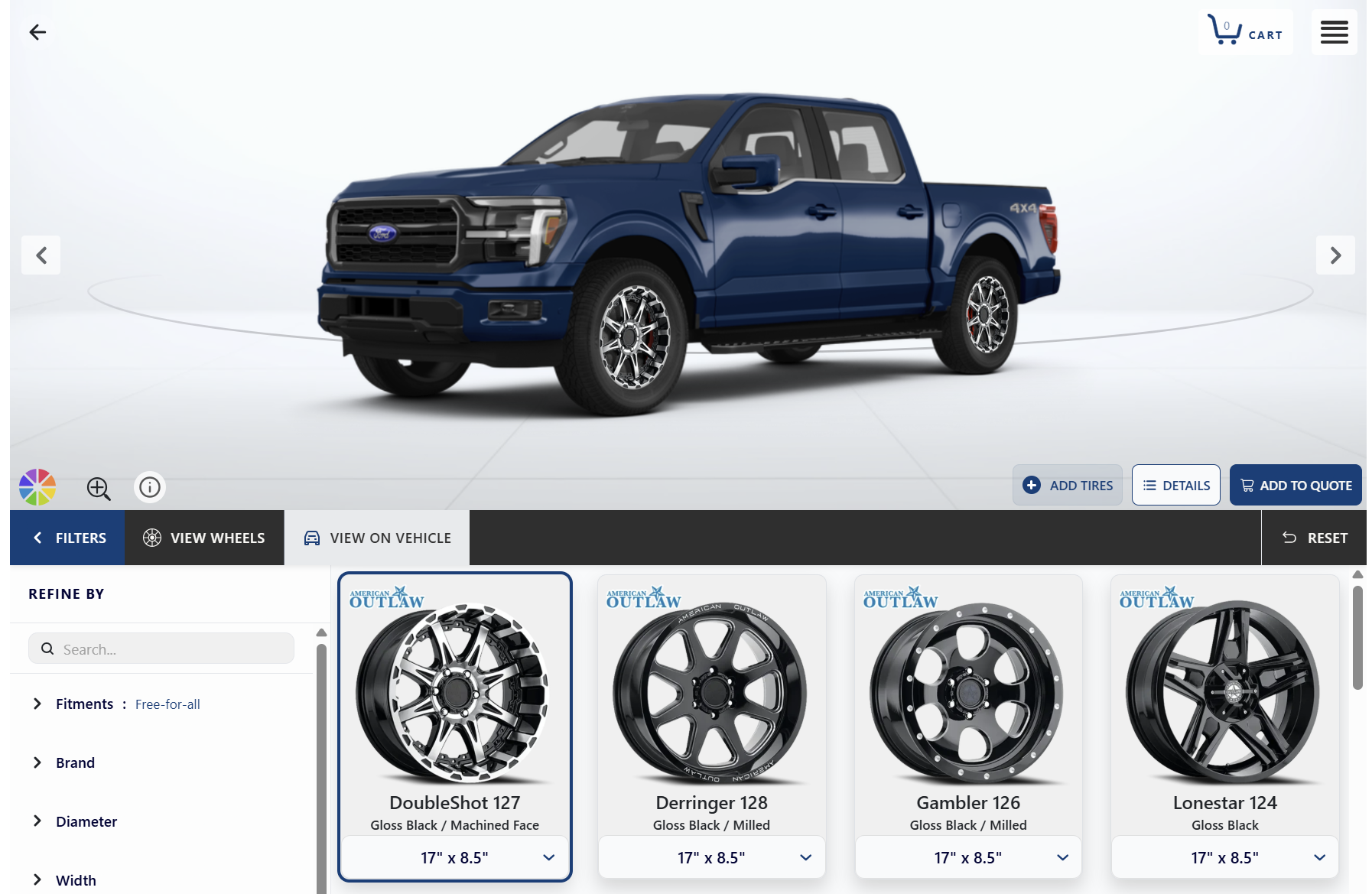
A wheel visualizer is an online tool that shows customers what a specific wheel will look like mounted on their actual vehicle. The customer selects their year, make and model, the visualizer loads an image of that vehicle, and every wheel in the catalog can then be previewed on it: different brands, finishes, sizes and angles, before anything is purchased or installed.
The best visualizers go further than a static preview. They render the vehicle from multiple angles (front, side, three-quarter and rear), account for suspension changes like lifts and lowering, and connect each wheel to real fitment data and live inventory, so what the customer sees is something the shop can actually sell and install.
How does a wheel visualizer work?
Under the surface, a wheel visualizer is three databases working together.
First, a vehicle library: rendered images of each year/make/model, ideally in multiple colors and from multiple angles. The Tireweb visualizer covers more than 1,000 vehicles, including specialty categories most tools skip: classic cars, hot rods, UTVs and golf carts.
Second, a wheel catalog: photography and specs for each wheel, normalized so a preview is accurate across brands. Tireweb's catalog spans more than 295 wheel brands.
Third, and this is the part shoppers never see but dealers should insist on, fitment data: bolt pattern, offset, hub bore and load rating, applied automatically per vehicle. Without fitment logic, a visualizer is a costume app: it can put a wheel on a picture of a truck that would never bolt onto the real one. With it, every wheel the customer falls in love with is one that actually fits.
Why shops with visualizers sell more wheels
Wheels are a high-ticket, appearance-driven purchase, which makes them psychologically different from tires. A tire buyer needs confidence in the product. A wheel buyer needs confidence in the outcome: will this look right on MY vehicle? No brochure, showroom display or counter conversation can answer that question as convincingly as a picture of their own truck wearing the wheels.
That confidence changes the sale in practical ways. Customers browse longer and consider more options, because trying on another wheel costs one tap instead of an act of imagination. They trade up more willingly, because the difference between the entry wheel and the premium one is suddenly visible instead of numerical. They share builds with the person who co-signs the decision. And they arrive at the counter pre-sold, asking "can you get these" instead of "what do you have."
A visualizer also captures the sale that doesn't happen today. Most wheel shopping happens on a phone, often in a driveway, usually at night. A shop whose website offers "call for wheel options" loses that shopper to whoever lets them play. Features like save-to-garage, shareable builds and stock alerts turn those browsing sessions into real leads with a vehicle and a wheel already attached.
What separates a good wheel visualizer from a gimmick
If you're evaluating a wheel visualizer for your shop or your dealer network, the differences that matter are mostly invisible in a demo:
Real fitment, not just pictures. Every rendered wheel should be filtered by bolt pattern, offset, hub bore and load rating for the selected vehicle. If the tool can show a wheel that doesn't fit, it will, and the mistake becomes your problem at the install bay.
Live inventory and pricing. A visualizer disconnected from stock sells wheels you don't have. Connected to your catalog and POS, it sells what's actually on the shelf, at today's price, with real freight.
Multiple angles and suspension options. A single front three-quarter view flatters everything. Front, side and rear views, plus lift and lowering options, show the customer the truth, and truck customers in particular buy the lift look, not the wheel alone.
Wheel and tire together. A wheel purchase is almost always a package purchase. A good visualizer pairs the wheel with a matching tire size in one cart, with stock and pricing live on both sides.
Mobile first. If the experience degrades on a phone, it degrades where the majority of wheel shopping actually happens.
A path to the sale. Retail customers should flow from build to install booking; wholesale buyers from build to bulk order. A visualizer that dead-ends at "visit us today" wastes its own momentum.
Adding a wheel visualizer to your website
This used to be an enterprise project. It isn't anymore. Tireweb Wheels includes a 3D wheel visualizer as part of its retail storefronts and wholesale dealer portals: 295+ wheel brands rendered on 1,000+ vehicles, fitment-aware search, wheel and tire packaging, and checkout with card, ACH and financing, all connected to your POS through the same integration layer that powers the rest of Tireweb. Retailers get install booking; distributors get a dealer portal with trade pricing on the same catalog.
You can try the live visualizer demo on a sample catalog, or book a walkthrough to see it running with your own inventory.
Wheel visualizer FAQ
Can customers see wheels on their actual car?
On their actual year, make, model and color, yes. The visualizer loads a rendered image of the selected vehicle and previews any wheel on it from multiple angles. It's a configured render rather than a photo upload, which is what keeps the preview accurate and consistent across thousands of wheel and vehicle combinations.
Are wheel visualizers accurate?
A good one is accurate in the two ways that matter: visually, because wheels are rendered to scale on the correct vehicle, and mechanically, because fitment data filters out wheels that wouldn't bolt on. Tools without fitment logic can be visually convincing and mechanically wrong.
Do wheel visualizers show tires too?
The Tireweb visualizer pairs wheels with matching tire sizes so the customer can build and price the complete package in one cart.
What about lifted trucks, classics or UTVs?
Lift and lowering options are built into the visualizer, and the vehicle library includes classic cars, hot rods, golf carts and UTVs alongside current models.
Does it work on phones?
The whole flow, vehicle picker, wheel browsing, tire pairing and checkout or booking, is built mobile-first, because that's where wheel shoppers actually are.