Tiresearch for auto dealerships: how it works with Tekion, Cox, CDK and Xtime
Fixed ops directors rarely object to selling tires online. They object to a second calendar, a second system and somebody rekeying orders. This is what Tiresearch actually connects to, what moves in each direction, and what changes on the service drive.
Most fixed operations directors do not need convincing that tires are worth selling. They need convincing that selling them online will not create a second calendar, a second system to check, and somebody on the drive rekeying orders at four in the afternoon.
That is the real objection, and it is a good one. A tire shopping tool that books appointments somewhere your advisors do not look is worse than no tool at all, because now you have missed appointments and an angry customer who did everything right.
So this is about the connections rather than the storefront. What Tiresearch actually plugs into, what information moves in which direction, and what your team has to do differently. If you want the business case for selling tires at a dealership first, we covered that separately in selling tires online at a dealership.
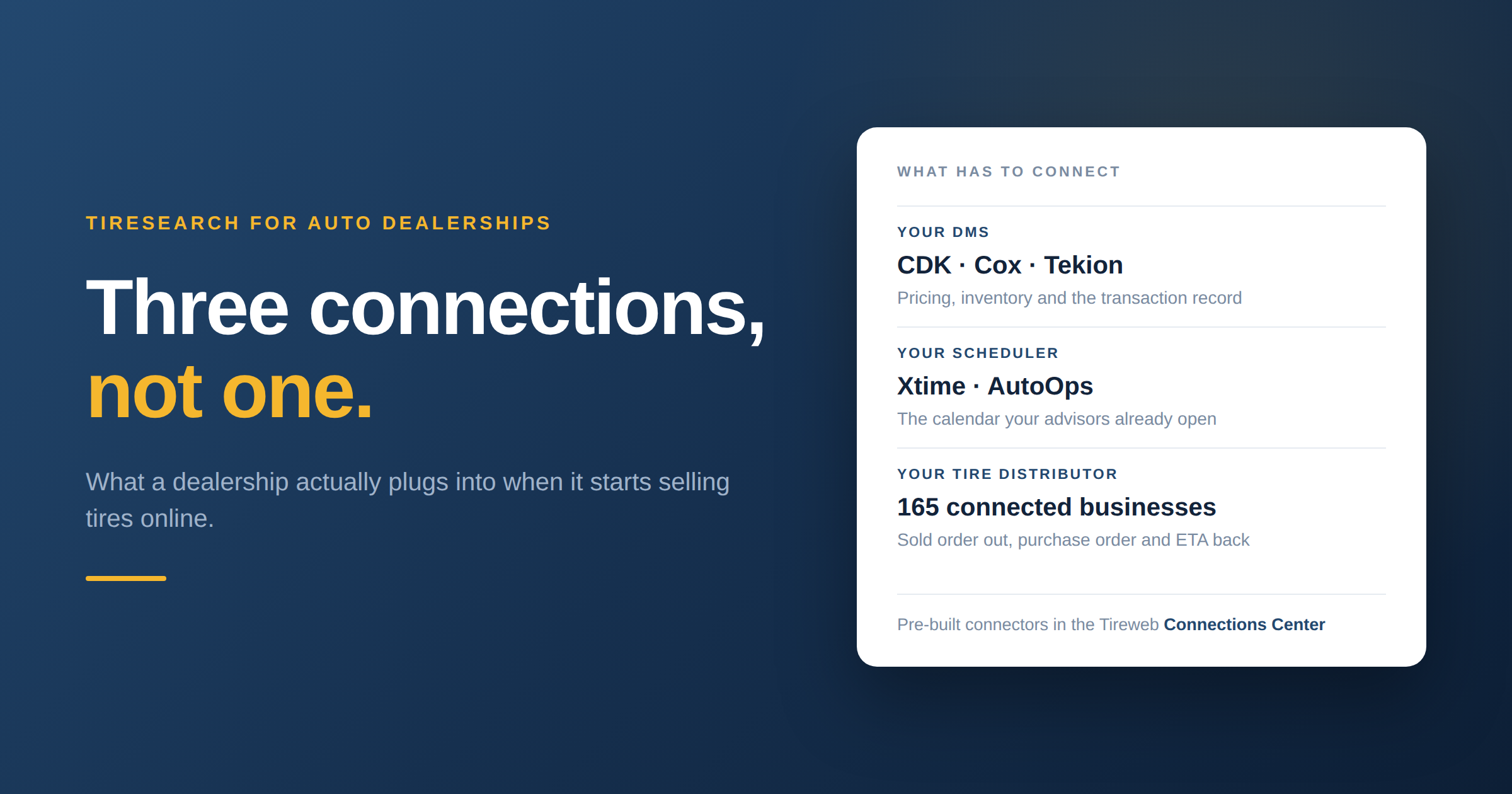
Three connections, not one
People talk about "the DMS integration" as though it is a single thing. For a dealership selling tires there are three separate connections, and they do different jobs.
Your DMS. CDK, Cox and Tekion are all pre-built connectors in the Tireweb connections directory, listed under DMS. This is the connection that keeps pricing and inventory honest and puts the transaction where your accounting expects it.
Your scheduler. Xtime and AutoOps are listed separately, as scheduling connectors. This is worth being precise about, because Xtime is a service scheduling platform rather than a DMS, and whether your appointments live in Xtime or in the DMS itself changes where the booking has to land. If you do not run either, Tiresearch has its own Bay Manager, though for a franchise store that is usually the wrong answer, because your advisors already live in something.
Your tire distributor. The sold order has to reach whoever actually ships the tires. The directory currently lists 165 connected tire businesses, including the national distributors that serve dealerships, so in most cases the supplier a store already buys from is already on the platform.
A tool that does one or two of those and leaves the third manual is where the double entry comes back.
What moves, and in which direction
The useful question in any integration conversation is not whether two systems are connected. It is what crosses the line and which way.
| Information | Direction | What it means in practice |
|---|---|---|
| Tire pricing and availability | Into the widget | Shoppers see real prices, not a stale price list |
| Markup and pricing rules | You set, widget applies | Rules by brand, line and segment, so nothing sells below your floor |
| Fitment for the vehicle | From Tirelibrary | Trim-level fitment including the original equipment fit |
| Appointment slot | Into your scheduler | Lands on the same service calendar your advisors already use |
| Bay availability | Into the widget | The customer cannot book a slot you do not have |
| The sold order | Out to your distributor | With a purchase order, and an ETA coming back |
| Order and payment record | Into your systems | No advisor rekeying what the customer already entered |
The two rows that matter most to a skeptical fixed ops director are the appointment and the order. If the appointment lands on the calendar your advisors already open every morning, nobody has to change their habits. If the sold order reaches the distributor with a purchase order attached and an ETA comes back, nobody has to make a phone call to find out whether the tires will be there on Thursday.
How a sale actually runs
- A customer lands on your website and searches by vehicle or by size. This is your existing site, with the widget on it, so it looks like you.
- Fitment resolves to the trim. Tirelibrary supplies trim-level fitment, including the original equipment fit, which matters more on your lineup than on a general tire site because your customers are largely in vehicles you sold them.
- They see your prices. Your markup rules have already been applied, so the number on screen is one you are happy to honor.
- They pick an install slot. The widget is looking at real bay availability, so they cannot book into a full afternoon.
- The appointment appears on the service calendar. Xtime, AutoOps or your DMS, whichever your drive actually runs on.
- The order goes to your distributor with a purchase order, and the ETA comes back.
- The customer arrives and your advisor sees a booked appointment with the tires already on order, the same as any other job.
The point of listing it out is that at no step does anyone at the dealership do something new. The work that used to be a phone call, a lookup and a manual order becomes a record that was already created correctly.
Pricing control is the part to test hardest
Every dealership that has been burned by a third-party tire program was burned on price.
Tiresearch puts the markup rules with you: by brand, by line, by segment. That means you can price the volume brands to compete with the tire shop down the road and hold margin on the premium lines, and you can keep the numbers aligned with what your F&I and service pricing conversations already assume.
The thing to actually test in a demo is the floor. Set a rule, then try to construct a scenario where the widget quotes below it, including on a size that is short on stock and has to fall back to a secondary supplier feed. Fallback pricing is where most systems leak margin, because the second feed costs more and the rule was written against the first.
The website problem franchise stores have
Independent dealers can rebuild a website. Franchise stores usually cannot, because the site is provided or controlled by the manufacturer, and the approval process for changing it is not worth the trouble for a tire page.
This is the main reason a widget suits dealerships better than a new website does. Tiresearch installs as a single script tag and a div, which is generally something a store can get added to an existing page without a platform change or a vendor negotiation. It starts at $75 a month with no setup fee and the stated time to launch is about a week, so it fits inside a quarter without a capital conversation.
If your web provider needs specifics before they will agree, the embedding guide is the document to send them.
What to have ready
- Know which DMS you run and which scheduler your advisors actually use. These are often different, and the second one is the one that matters for bookings.
- Know who supplies your tires and how you order today. If it is a phone call to a distributor, say so, because that is the step being replaced.
- Decide your markup rules before launch, not after. Coming up with pricing under time pressure during a launch week is how a store ends up with a floor it did not intend.
- Decide who owns it. Someone has to own tire pricing the way someone owns menu pricing. It does not take much time, but it does need a name against it.
- Check whether your DMS is on the list. CDK, Cox and Tekion are pre-built. If yours is not in the directory, Tireweb adds platforms on request, but that is a timeline question worth asking before you plan around a date.
Questions
Does this replace my DMS? No. It connects to it. Nothing about how your service drive is run changes, and the DMS remains the system of record.
Where does the appointment land? On whichever calendar your advisors already use, through the Xtime or AutoOps connector or through the DMS. This is the first thing to confirm in a demo, using your own setup rather than a generic one.
What if my DMS is not on the connections list? Tireweb adds platforms on request. Ask early, because it changes the timeline.
Will my advisors have to learn a new system? They should not. The intended outcome is a normal booked appointment with the tires already ordered. If a demo shows your team logging into something new to check tire orders, push back.
Can I control what shows up and at what price? Yes, through markup rules by brand, line and segment. Test the floor, including the case where stock falls back to a secondary supplier.
Does it work on a manufacturer-controlled website? Usually, because it is a script tag rather than a platform change, but it depends on what your web provider permits. The embedding guide is written for that conversation.
How is the fitment data accurate for the vehicles we sell? It comes from the Tirelibrary catalog at trim level, including the original equipment fitment. Trim matters more than people expect, since drivetrain and payload variants of the same model often take different sizes.
See it running
The fastest way to judge this is to use it. The Tiresearch live demo is the actual widget running on a sample catalog, so you can search a vehicle, look at the results and step through the checkout the way a customer would. Pricing and inventory in the demo are sample data, but the flow is real.
Then, if it looks right, book a walkthrough and bring three things to it: the name of your DMS, the name of the scheduler your advisors actually open, and the distributor you buy tires from. Those three answers determine what your integration looks like, and a demo built around them will tell you more in half an hour than any amount of feature comparison.

Matthew Walker
Chief Executive Officer, Tireweb
Matthew Walker is the CEO of Tireweb, where he works with tire businesses around the world to help them operate more efficiently and serve customers better through technology. Having spent much of his career at the intersection of tires, automotive retail, and software, Matthew enjoys exploring new ideas, industry trends, and practical ways businesses can embrace change. His articles focus on the real-world challenges facing the tire industry and the opportunities technology creates for future growth.