Connect your AI assistant to 240,000 tires in five minutes
Give Claude, ChatGPT or any MCP client access to the Tirelibrary catalog: fitment, specs and current rebate programs. One URL, browser sign-in, no API key. Here is the setup and the first four questions worth asking.
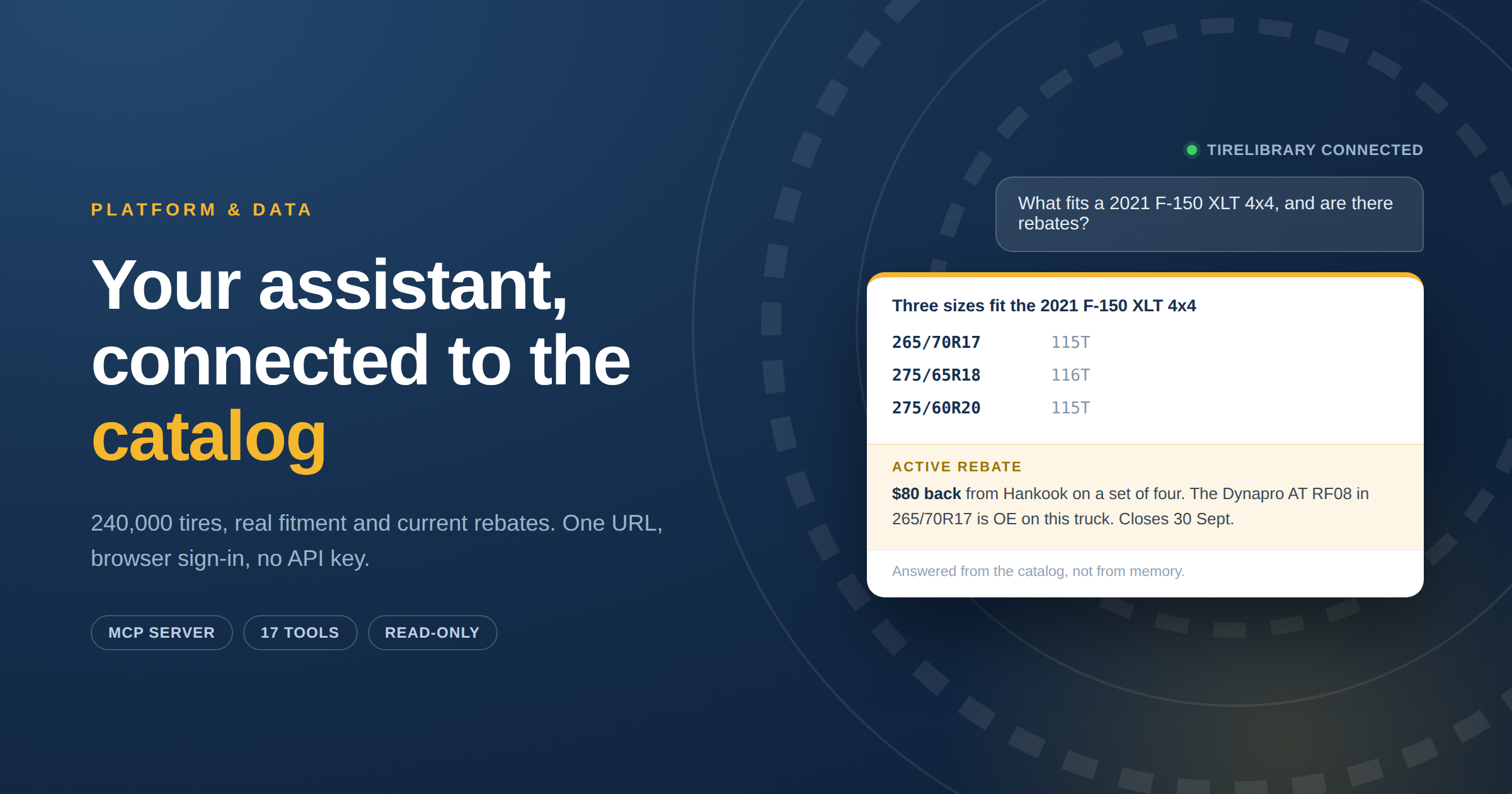
Ask any AI assistant what tires fit a 2021 F-150 XLT and you will get a confident, well-written answer. Some of it will be right. You will not be able to tell which part.
That is not a flaw in the model. It is a model answering from memory about a catalog that changes weekly, across hundreds of brands, where the same tire is described five different ways by five different suppliers. Confidence and accuracy are unrelated in that situation.
The fix is not a better prompt. It is giving the assistant somewhere real to look.
Tirelibrary is available as an MCP server, which means the assistant you already use can query the actual catalog: 240,000+ tire SKUs, vehicle fitment, full specs, and current manufacturer rebate programs. It stops guessing and starts looking things up.
Setup takes about five minutes and there is no API key to manage.
What this actually is
The Model Context Protocol is a standard way for an AI assistant to use external tools. Instead of you copying data into a chat window, the assistant is given a set of functions it can call on your behalf, and it decides when to call them.
Connecting the Tirelibrary MCP server gives your assistant 17 read-only tools. When you ask what fits a vehicle, it calls the fitment tool rather than recalling. When you ask about rebates, it reads the current programs. The answer comes back in conversation, but it came from the catalog.
The data is the same data the Tirelibrary REST API serves and the same catalog behind every Tireweb product. MCP is a different door into it, not a different dataset.
What you need
Two things.
An active Tirelibrary API membership. Same subscription that covers REST API access.
An MCP-compatible client.
You do not need an API key. Authentication happens through a browser sign-in with your existing Tirelibrary account.
The setup
In Claude.ai:
- Go to Settings → Connectors → Add custom connector
- Enter the server address:
https://mcp.tireweblibrary.com/sse - Click Connect. An authentication window opens.
- Sign in with your Tirelibrary email and password.
- That is it. The tools are now available in your conversations.
The address again, to copy:
https://mcp.tireweblibrary.com/sseSessions renew automatically. After roughly a week of inactivity you will be asked to sign in again, which takes one click.
Your first four questions
Start with these, in this order. They exercise different tools and they show you quickly whether this is useful for how you actually work.
"What fits a 2021 Ford F-150 XLT?"
The assistant calls the fitment tool and returns the sizes that fit, including front and rear positions where they differ. One question, one call. No walking through year, then make, then model, then trim.
"Do you have the CrossClimate 2 in 225/65R17?"
This is the counter question, and it gets answered directly rather than by browsing a catalog. Behind it, the assistant checks whether that pattern is produced in that size.
"Compare the top three all-season options in that size."
Side-by-side on specs, ratings and warranty. The comparison tool handles two to four tires at once.
"Are there any active rebates on the CrossClimate 2, and what does the customer need to submit?"
This is the one worth trying even if you skip the others. The assistant returns the current programs for that tire, what the customer gets back, the documents they need, the submission deadline and the form.
That is a selling tool. A rebate is often the difference between a customer taking the premium tire and taking the cheaper one, and it only works if the person at the counter knows about it while the customer is still standing there. Right now that means remembering which programs are running this month across many brands, or going away to look it up while the customer waits. Neither happens reliably, so the rebate goes unmentioned and the sale goes down-market.
What the assistant can reach
All 17 tools, grouped by what they are for.
Finding a tire. Broad filtered search across roughly twenty attributes including season, terrain, UTQG, run-flat, 3PMSF and studdable. Search by exact size. Search within one manufacturer. Exact lookup by item number. Full spec detail for a single SKU. Side-by-side comparison of two to four tires.
Vehicle fitment. Year, make, model and optional trim to fitting sizes, in a single call.
Brands and patterns. Every manufacturer in the catalog. Browse patterns across makes or within one make. Full pattern detail including all available sizes. Check whether a pattern comes in a specific size. Retrieve the available filter values, which is what you want if you are building a search interface rather than asking questions.
Rebates. Current programs with status filters. Full rebate detail including the form, the documents the customer needs, the deadline and what they get back. Every rebate that applies to a specific SKU. Every rebate that applies to a pattern across all its sizes.
What it cannot do
Worth being explicit, because it determines whether this is the right tool for your problem.
It is read-only. The assistant can search and read. It cannot change anything in the catalog, and there is no path by which a badly worded question modifies your data.
It is not your inventory. This is catalog and rebate data, not what is on your shelf this afternoon and not your buy price. Those live in your POS and with your distributor.
It cannot place an order. No cart, no checkout, no purchase.
If you need live supplier stock and the ability to place orders, that is Connections, a different Tireweb surface built for exactly that.
MCP or the REST API?
Both reach the same data. The right choice depends on what you are building, and picking wrong costs a week.
Use the MCP server when a person is in the loop. An assistant on someone's desktop, a service advisor asking questions, a sales team looking up specs without opening the portal, a category manager doing ad-hoc analysis. Browser sign-in is fine because there is a browser and a human.
Use the REST API when nothing is watching. A production integration, a nightly catalog sync, a customer-facing agent on your website, anything running unattended on a server. Those need a static API key rather than an interactive OAuth session that expires after a week of inactivity.
A useful rule: if the thing calling the catalog has a screen and a person in front of it, use MCP. If it runs on a schedule, use the API.
Practical notes
Rate limits apply, the same as on the REST API. If you are asking questions in a chat window you will never reach them.
Errors come back as data, not failures. A tool that cannot fulfil a request returns an error object rather than throwing, so the assistant can tell you what went wrong instead of stalling.
Search results are paginated in the same shape the REST catalog endpoints use, so if you already work with the API, the responses will look familiar.
Frequently asked questions
Do I need an API key? No. Authentication is a browser sign-in with your Tirelibrary account.
Which plan do I need? An active API membership, the same subscription that covers REST API access.
Is my data going anywhere? The tools are read-only and query the Tirelibrary catalog. Nothing about your business is written or shared.
Why does it ask me to sign in again? Sessions renew automatically, but after about a week of inactivity you will be asked to re-authenticate. One click.
Can I use this instead of the API? For interactive work, yes. For anything running unattended, use the API. See the section above.
How current is the rebate data? Rebate programs are maintained on the same daily cycle as the rest of the catalog.
Get connected
If you already have a Tirelibrary API membership, the server address above is all you need.
If you do not, or you want to see what your team could ask before committing, get in touch and we will show you the catalog and the assistant working together on your own questions.